Portfolio / Tools / Linux Install Helper
Linux Install Helper
v1.0.1 · Oct 5, 2026A Windows app that creates a bootable Linux USB drive in a few clicks: pick a distribution, and the tool downloads the official ISO image, checks that it is authentic (checksum and OpenPGP signature), then writes it to the drive.
Download
Verify the SHA-256 checksum
- win-x64
1f34f5edd29469c2be785b10a5b6173665a20a10d1b2e4048934e8a235c793ce - win-arm64
e1116d8e79917ef0cc1b221333ef16341edf5697ad22f68f81431325bccf3588 - In PowerShell
Get-FileHash .\LinuxInstallHelper-1.0.1-win-x64.exe
Administrator rights are requested at launch: writing directly to a USB drive requires them. The executable is not signed with a code-signing certificate, so Windows SmartScreen may show a warning on first launch: "More info", then "Run anyway".
Screenshots
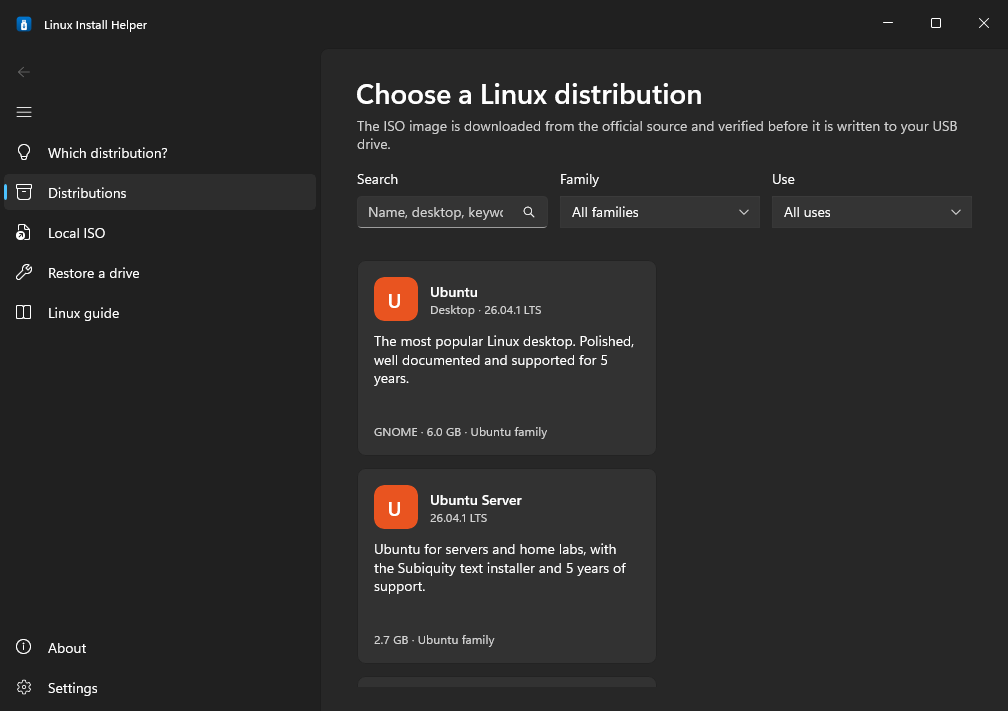
The distribution catalog, with search and filters (dark theme)
What it does
Distribution advisor
Six questions (experience, how powerful the PC is, usage, desktop style…) to recommend the best-suited distribution, and explain why.
15 distributions
Ubuntu, Debian, Linux Mint, Fedora, Arch, Kali… with search and filters. The catalog updates online and also works offline.
Official downloads
Only from official sources, over HTTPS: progress, time remaining, resume after a dropped connection and fallback mirrors.
Verified before writing
Official SHA-256 and OpenPGP signature, with keys pinned by fingerprint. An image that is not authentic is never written.
Safe drive selection
Only removable USB drives are offered: never the system disk or an internal disk. Double confirmation before erasing.
Verified write
The ISO is copied as-is, then the drive is read back and compared with the image before being safely ejected.
Local ISO
Use an image you already downloaded, with an optional SHA-256 check.
Restore a drive
Once you are done, the drive is erased and reformatted as exFAT so it becomes a regular drive again.
Linux guide
A checklist to prepare leaving Windows (backups, passwords, BitLocker key…) and the basics to get started.
How it works
- PickA distribution from the catalog, or an ISO already on your disk.
- ResolveThe official checksum file is fetched and its signature verified: it gives the exact ISO name and its hash.
- DownloadOver HTTPS, with resume and fallback mirrors. An ISO already present and valid is reused.
- VerifySHA-256 of the image, plus the signature of the ISO itself for Arch and Manjaro.
- WriteRaw copy of the hybrid ISO, like
ddor balenaEtcher, then the drive is read back. - EjectThe drive is ready: all that is left is to boot from it.
Safeguards
- A disk is only offered if it is on the USB bus (checked against two Windows sources) and is neither the system disk nor the boot disk.
- It must not hold Windows, the page file, the app or the ISO, and must be between 1 and 256 GB: beyond that, it is probably an external hard drive.
- Two-step confirmation: a checkbox naming the drive, then a dialog whose default button is "Cancel".
- Right before writing, the drive is compared with the one confirmed (number, ID, serial number, size). Unplugged or swapped: nothing is written.
- Nothing is written until the image is verified, and an invalid image is deleted.
Available distributions
Secure Boot must be disabled in the UEFI to boot these distributions; the app reminds you.
New minor releases are picked up automatically through the official checksum files, and every catalog link is tested weekly.
Under the hood
| Language | C# on .NET 8, published as a single self-contained executable (x64 and ARM64) |
|---|---|
| Interface | WinUI 3 (Windows App SDK), MVVM architecture, automatic light or dark theme, in English and French |
| Cryptography | SHA-256 / SHA-512, OpenPGP verification with BouncyCastle, distribution keys pinned by fingerprint |
| Tests | xUnit on the core of the app: catalog, disk filtering, safeguards, verification |
| CI/CD | GitHub Actions: build and tests on every push, startup test with screenshots, automatic releases, weekly check of the catalog links |
| License | MIT, source code on GitHub |