Quai
v1.1.1 · Nov 18, 2026An SSH, SFTP and serial port connection manager for Windows, with a native interface: a connection book to keep your servers organized, a tabbed terminal built on the Windows Terminal engine, and a dual-pane file browser. In the spirit of Termius, WinSCP, MobaXterm or PuTTY, only lighter.
Download
0 downloads, including 0 this month
Verify the SHA-256 checksum
- Setup-x64
b560c8c0c79397d531d7e1ab32d1edb43329d69a1c636cddccf9de0a3903446e - Setup-arm64
57126a8d883b014672b383171e5c49861c81dd5b8be7d9c21cd8df720b0a08c5 - x64.zip
d037602fff1981dfaa1ff8b744d36d57761c65bb60ed13318a652eb3dc67e0ea - arm64.zip
b56c324d5f6495340a08410c1b970f33bb06f45d39e5d66277f4ae3ca933f2bc - In PowerShell
Get-FileHash .\Quai-Setup-x64.exe
The installer sets Quai up for your account only, without administrator rights, and adds a Start menu shortcut; the portable version just needs to be unzipped and run. The executables are not signed with a code-signing certificate, so Windows SmartScreen may show a warning on first launch: "More info", then "Run anyway".
Screenshots
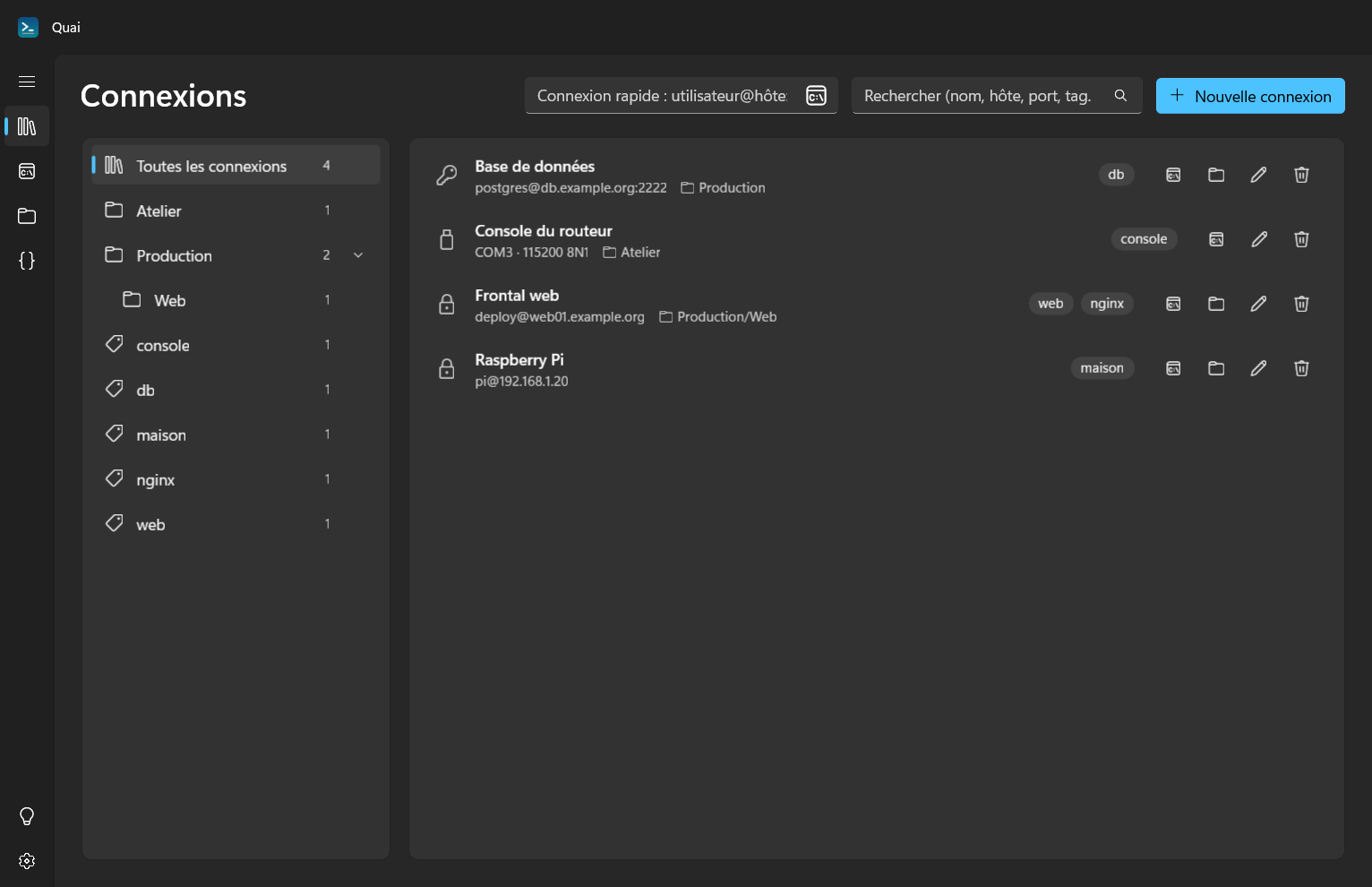
The connection book: SSH servers and serial ports, sorted by folders and tags (French UI)
What it does
Connection book
SSH servers and serial ports in the same book, sorted by collapsible folders (Prod/Web) and tags, with an instant search that ignores accents.
Quick connect
Type alice@server at the top of the book and press Enter: the terminal opens, no form to fill in. One button adds it to the book if you need it again.
Tabbed terminal
The native Windows Terminal engine: DirectWrite / Direct3D rendering, colors, UTF-8, the usual copy and paste. No embedded browser.
Snippets
Save the commands you type often once, then send them to the terminal with Ctrl+Shift+P, filtered by name or command.
Automatic reconnect
Wi-Fi drops, PC wakes from sleep: the terminal retries on its own and shows where it stands. A keep-alive stops firewalls from cutting idle sessions.
Serial port
Router or switch console, Arduino, ESP32, Raspberry Pi: 300 to 921,600 baud, parity, flow control and Break signal. 9600 baud 8N1 by default, like PuTTY.
SFTP browser
This computer on the left, the server on the right, with drag and drop. From the terminal, one button opens it right in the shell's current folder.
Edit a remote file
Right-click, "Edit": the file opens in your usual editor and every save goes back to the server. If it changed in the meantime, Quai asks before overwriting.
Transfers and permissions
Progress, cancel, confirmation before overwriting; rename, permissions (checkboxes or octal), delete. An interrupted transfer never leaves a truncated file.
Password or key
OpenSSH, PEM or PuTTY private keys, passphrase included. Passwords and passphrases can be remembered, always in the Windows vault.
Verified host key
The server's SHA-256 fingerprint is shown on first contact, then a red alert warns you if it changes. This check cannot be turned off.
One-click updates
When a new version is out, a banner says so and one button is enough: Quai updates itself and restarts. The check can be turned off in the settings.
How it works
- InstallA single installer, no administrator rights, or the portable version to unzip.
- AddA server (host, port, user, password or key) or a serial port (
COM3, speed, parity…). - VerifyOn first contact, the host key fingerprint is displayed: compare it with the one from the server's administrator before typing anything.
- ConnectThe terminal opens in a new tab; tabs survive switching from one page to another.
- TransferThe SFTP browser opens on the same connection: drag and drop, permissions, renaming.
- CloseOpen sessions and running transfers are listed before quitting, then each connection is closed cleanly.
Security
- Passwords and passphrases live only in the Windows vault (Credential Manager): never in a file, a log or an error message.
- The connection book cannot hold a secret: a connection does not even have a field to store one.
- Nothing is typed for an unverified server: with no saved password, a first connection checks the host key before asking for it, in the same order as OpenSSH.
- Changed host key: red alert, "Cancel connection" by default. Replacing the saved key (reinstalled server) takes a deliberate click.
- No telemetry. The only connection outside your servers: the latest version number, read at startup from GitHub's public API, and it can be turned off.
Where is my data?
In %LOCALAPPDATA%\Quai, as plain readable files:
connections.json | The connection book, with no secrets |
settings.json | The settings |
known_hosts | Accepted host keys, in OpenSSH format |
logs\ | Logs from the last 7 days |
To uninstall: Windows Settings, Apps, Quai. The uninstaller asks whether to also erase this data and the vault secrets; by default, they are kept.
Under the hood
| Language | C# on .NET 10, published self-contained for x64 and ARM64: nothing else to install |
|---|---|
| Interface | WinUI 3 (Windows App SDK 2, unpackaged), MVVM architecture with CommunityToolkit, Mica background on Windows 11 |
| Terminal | The Windows Terminal engine (Microsoft.Terminal.Control, MIT license), hosted natively |
| Protocols | SSH and SFTP with SSH.NET, serial port with System.IO.Ports |
| Tests | xUnit: unit tests, and integration tests against a real OpenSSH server and real virtual serial ports (socat) |
| CI/CD | GitHub Actions: x64 and ARM64 builds, Inno Setup installer, silent install, smoke test of the installed app with screenshots, verified uninstall, automatic releases |
| Not yet | Tunnels and port forwarding, jump hosts, OpenSSH agent, ssh_config or PuTTY import, resuming an interrupted transfer, English interface |
| License | MIT, source code on GitHub |