Quai PDF
v0.2.0 · Nov 26, 2026A basic PDF reader and editor for Windows, with a native interface: tabs to open several documents, search, text copying, text boxes written on the page, and tools to rotate, reorder, delete, merge or extract pages. Nothing is written to disk before "Save".
Download
0 downloads, including 0 this month
Verify the SHA-256 checksum
- Setup-x64
c67359e600e601c4bb3fb95930eb97d54459faf9b5466ecb58f151d652187297 - Setup-arm64
480cdc3dc2fd68973aece8205d83ef946c6d273e9611062b1dbc5306dc6ebdda - x64.zip
d2af36573bb0338e7c0e2dcfd3f40237eb4429f73c23ec337d50ebe9be6c8f04 - arm64.zip
2eb70122e6676d992dd349e70d1f5a9c28f5fd9bc5d1d822bb87cc870e905019 - In PowerShell
Get-FileHash .\QuaiPdf-Setup-x64.exe
The installer sets Quai PDF up for your account only, without administrator rights, and adds it to the Start menu and to "Open with" for your PDFs; the portable version just needs to be unzipped and run. The executables are not signed with a code-signing certificate, so Windows SmartScreen may show a warning on first launch: "More info", then "Run anyway".
Screenshots
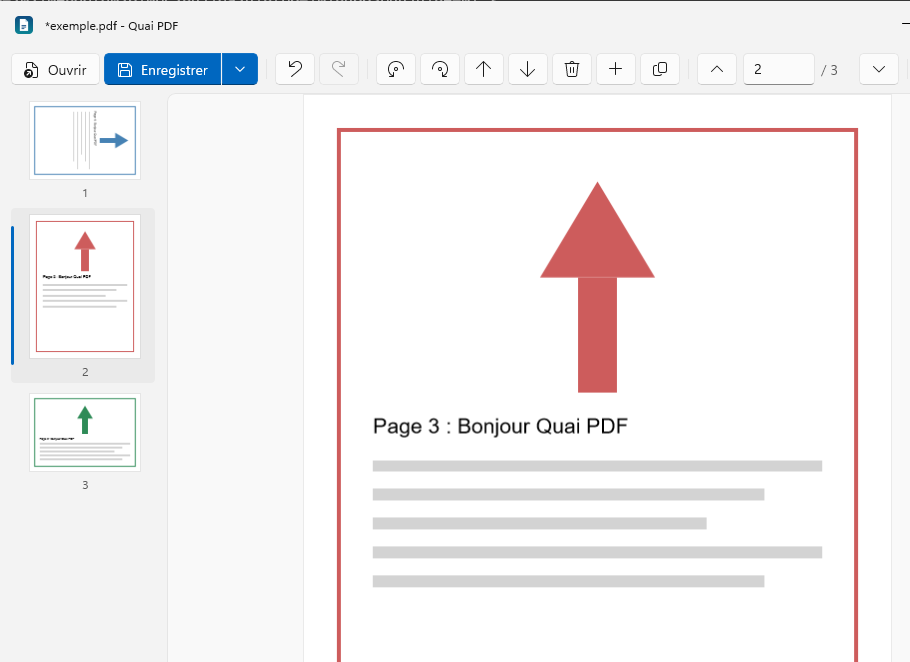
Thumbnails on the left, the page on the right; the first page has just been rotated
What it does
Several documents
Each PDF opens in its own tab, like in Windows 11 Notepad. A PDF opened from File Explorer joins the window that is already open.
Read
Scrolling, zoom (Ctrl+wheel), fit to width; on the left, page thumbnails, the document outline, search results or properties.
Search
Ctrl+F, a word, Enter: every match, ignoring case and accents, and F3 for the next one.
Copy text
Select with the mouse as on a web page, double-click for a word, Ctrl+A for everything, then Ctrl+C. A copy restriction set by the author is respected.
Write on the PDF
"Text" button, click on the page, type: a text box that Chrome, Edge, Firefox and Acrobat display identically, and the other way round.
Straighten pages
A page scanned upside down or sideways rotates with Ctrl+R, alone or with every page selected in the thumbnails.
Reorder and sort
Drag thumbnails to change the order; Del removes unwanted pages. At least one page always remains.
Merge and extract
Pages from other PDFs go in after the current page (Ctrl+I); a few pages can be saved as a new PDF (Ctrl+E).
Change your mind
Undo (Ctrl+Z) and redo (Ctrl+Y) over 30 steps. Nothing is written to disk before "Save".
How it works
- InstallA single installer, no administrator rights, or the portable version to unzip.
- Open"Open" button, drag and drop from File Explorer, or right-click a PDF, "Open with", Quai PDF.
- ReadScroll, zoom, search for a word, jump to a chapter from the outline.
- EditRotate, move, delete or insert pages, write a note on the page.
- SaveA dot on the tab flags pending changes;
Ctrl+Swrites them,Ctrl+Shift+Smakes a copy.
Security
- No web page, no embedded browser: a PDF is displayed without running a single script.
- A password-protected document opens read-only: its protection is never removed behind your back, and the password is never saved.
- A structure Quai PDF cannot safely rewrite leaves the document read-only rather than damaging it.
- An update is only installed after its SHA-256 checksum is verified; a file that differs from the published one is deleted without being run.
- No telemetry. Its only connection: the latest version number, read at startup from GitHub's public API, and it can be turned off.
Where is my data?
In %LOCALAPPDATA%\QuaiPdf, as plain readable files:
settings.json | Settings: theme, side pane |
logs\ | Logs for the last 7 days: names of opened files, never their content |
updates\ | An update's installer, deleted at the next startup |
Your documents stay where you put them: Quai PDF keeps no copy of them.
Under the hood
| Language | C# on .NET 10, published self-contained for x64 and ARM64: nothing else to install |
|---|---|
| Interface | WinUI 3 (Windows App SDK), MVVM architecture with CommunityToolkit |
| Rendering | Pages are drawn by the PDF engine built into Windows, text is read by PDFium, Chrome's PDF engine |
| Writing | PDFsharp, a proven open-source library, for every change |
| Tests | xUnit on the core library, independent of the interface |
| CI/CD | GitHub Actions: x64 and ARM64 builds, installer, automatic releases with their checksums |
| Not yet | Text recognition on scanned pages, highlighting and drawing, forms, signatures, printing, editing page text, English interface |
| License | MIT, source code on GitHub |